Friday, January 30, 2015

The Robots are Here!


We are so excited to have the opportunity to try out some new robots with our Tech Team and my second grade class! Thanks to generous donations, our Donors Choose project was funded in less than 3 days and 2 weeks later the robots are here!

30 minutes before school started on Friday
We gathered the Tech Team before school to open the boxes and see what we have. Immediately, one of the kids found the app to program them, downloaded and started figuring it out! 


Later that day, my second graders tried out both of the Dash robots and put them through a few paces. We still don't know what Dot does, but we'll work on that when Tech Team meets officially.

Here's Dot

These are the same kind of robots that visited the White House during the Hour of Code week. We can't wait to get started programming them!

Dash and Dot at the White House

Wednesday, January 28, 2015

Google Form Fun


What's there not to love about Google Forms? There are countless ways to use them. This week we are being Word Detectives. Students are finding new or interesting words and predicting the meaning before looking up the word in an online dictionary.
Here's an image of the form they are using for their words


You can check out a copy of the live form here. Word Detective Google Form  (Cleaned up my drive and this form is gone - out of date).

From the linked spreadsheet, I grabbed the list of words the kids have submitted so far and created a Wordle out of the list. 


Another variation is to intro a topic with images and video clips. As they viewed the images and clips, I had the kids submit words that they thought of into a form. Again I pulled their responses into a word art with Wordle. Looking at the word art helped us think about what we know and come up with questions that we would like to research.


Here are some of the questions that they have come up with so far:

  • Are these lava rocks?
  • why do they erupt. why do they make land?
  • Was that the island that was created in the Pacific ocean? How many rocks were there?
  • how does it explode?
  • how does it blow up bursting in the air when it erupts?
  • how do the people who take pictures not die?
Please comment with a way you have used Google Forms with your class.

Tuesday, January 27, 2015

We Rocked Hour of Code!


Last month, our elementary school participated in the Hour of Code, a global event to introduce computer science to students around the world.

Every student, Kindergarten through fifth grade, was able to try coding through Code.org in the computer lab guided by Mrs. Rockett, our awesome computer lab teacher. All of the students can and are continuing to learn computer science through activities on the school website.

The coding activities include continuing the computer science course through Code.org, creating games and apps through Scratch, programming a virtual robot through Lightbot, and many more.

On Friday, January 16th, at our Friday Flag Salute assembly, we were able to share how we did with coding through the Hour of Code. Our students wrote 190,043 lines of code! And the ones that did the most were the first graders, with one class rocking it, having written 8811 lines of code! (This counts only the Code.org activities as those are the ones I could find and add up. We also did Made with Code by Google, and some Scratch and other activities.)


Revealing the total for the lines of code. This is just before the 1 joined us to reveal 190,043 lines of code!

We are excited to continue learning about coding and computer science. We have added an after school class and are finding ways to add it into our school day. Coding helps us develop excellent problem solving and critical thinking skills!


Sunday, January 18, 2015

Using Class Dojo to Encourage Students to Go Beyond!


I've been a fan of Class Dojo since almost the very beginning. I think the program was released in August, 2011 and my friend and teaching buddy, Marla, got me started in November of that year. Since then, my students have enjoyed seeing their little monsters every day. Some years we have changed them to our own characters like princesses, pirates, and jungle animals. Other years we just see which are assigned randomly.

We've grown along with Dojo, by adding behaviors that are important to us and bringing this little window into our day to the parents through the parent sign up. Our class focuses mostly on the positives - I think this year we've issued one negative. It's nice to work on what we are doing right and try to make that happen more often.

One new behavior we've added this year is Challenge Accepted. When we have something beyond our daily lesson that would be interesting to research, learn, or do - then students can earn Challenge Accepted Class Dojo points. We have several levels of points based on what we think the challenge may be worth.

Over winter break, I asked students to write about their break activities to add to My Maps (something new I learned over break from Molly Schroeder). Their writing needed to be in complete sentences, checking punctuation and capitalization. As an optional task to keep them writing on their break, they earned +3 Challenge Accepted points.

Whenever we come across an interesting question, like "What does am or pm stand for?" Students who take the opportunity to look it up and report back earn a Challenge Accepted point.

A student decided to practice addition and subtraction 2 and 3 digit problems over break without being asked. She was so excited to show me. She didn't even think to ask about Challenge Accepted points but definitely deserved the points!

To encourage kids to try new genre in their independent reading, we currently have a Reading Bingo Challenge. When they read titles from different genre across the bingo row and pass AR tests on the books they earn a whopping +15 Challenge Accepted points!

Check out more about Class Dojo and their new app in this article by Richard Byrne.
ClassDojo Releases a Streamlined New App - Now You Can Send Pictures Too

Give it a try! Challenge Accepted!

Wednesday, January 14, 2015

Google Classroom Mobile App


Since Google Classroom was launched last summer, over 30 million assignments have been turned in through Classroom according to Jorge Lugo. "If those assignments had been on paper instead of Google Docs, they would stretch from New York to Los Angeles when laid end to end. If every assignment had taken just one minute to print out, Classroom saved 57 years that would have otherwise been spent waiting for the printer." 
Today, I saw the announcement for a Google Classroom Mobile App. I immediately ran, not walked, to go get it! I can't wait to try it!
Check it out for yourself! https://itunes.apple.com/us/app/google-classroom/id924620788
http://googleforwork.blogspot.co.uk/2015/01/A-Classroom-mobile-app-and-new-teacher-goodies.html

Sunday, January 4, 2015

Expert Help: Alice Keeler on Google Sheets: Creating a Line Graph


My class has done the Journey North Mystery Class Project for several years. It's a year long project that takes us through tracking daylight and observing changes to using geographical clues. We will be looking for 10 Mystery Classes located somewhere around the world.
So far, we've always graphed the data on paper and posted them in the classroom. We will still work on that, but I wanted a way the kids could see the data online so they could refer back to it, talk about what it means, and make predictions. I was stuck because I couldn't get the data into a line graph in Google Sheets or Excel.
One morning I posted the question to Alice Keeler (@AliceKeeler).

 Twitter Question
She asked a few more questions, I shared the Google Sheet file with her, and was able to watch as she moved things around and made it work! The amazing thing about Google Sheets, or any Google Doc, is the ability to share in real time! She commented right in the file and showed me where I went wrong and how to fix it. Not only do I have a line graph that I had been trying to figure out for several years, but I know how to do it myself the next time!

Click here for the explanation in Alice Keeler's blog. AliceKeeler.com

http://www.alicekeeler.com/teachertech/2015/01/04/google-sheets-creating-a-line-graph/

Alice Keeler's Blog

Thursday, January 1, 2015

Fun with My Maps


Recently I came across a link from Twitter to a you tube video from Teach Tech Play. They do a monthly teacher web share of lessons, tips, and ideas. This was December's episode and Molly Schroeder shared a great tip for using Google's My Maps with Google forms to share geographical data. You see Molly's part of the episode here. Teach Tech Play Episode 6.


Start at 30:15 to watch Molly's segment.
Basically, what you do is set up a Google form to collect data that includes location info. The collected info is gathered in a Google spreadsheet. Open My Maps (or just Google it). Follow Molly's instructions and demo on how to import the data.


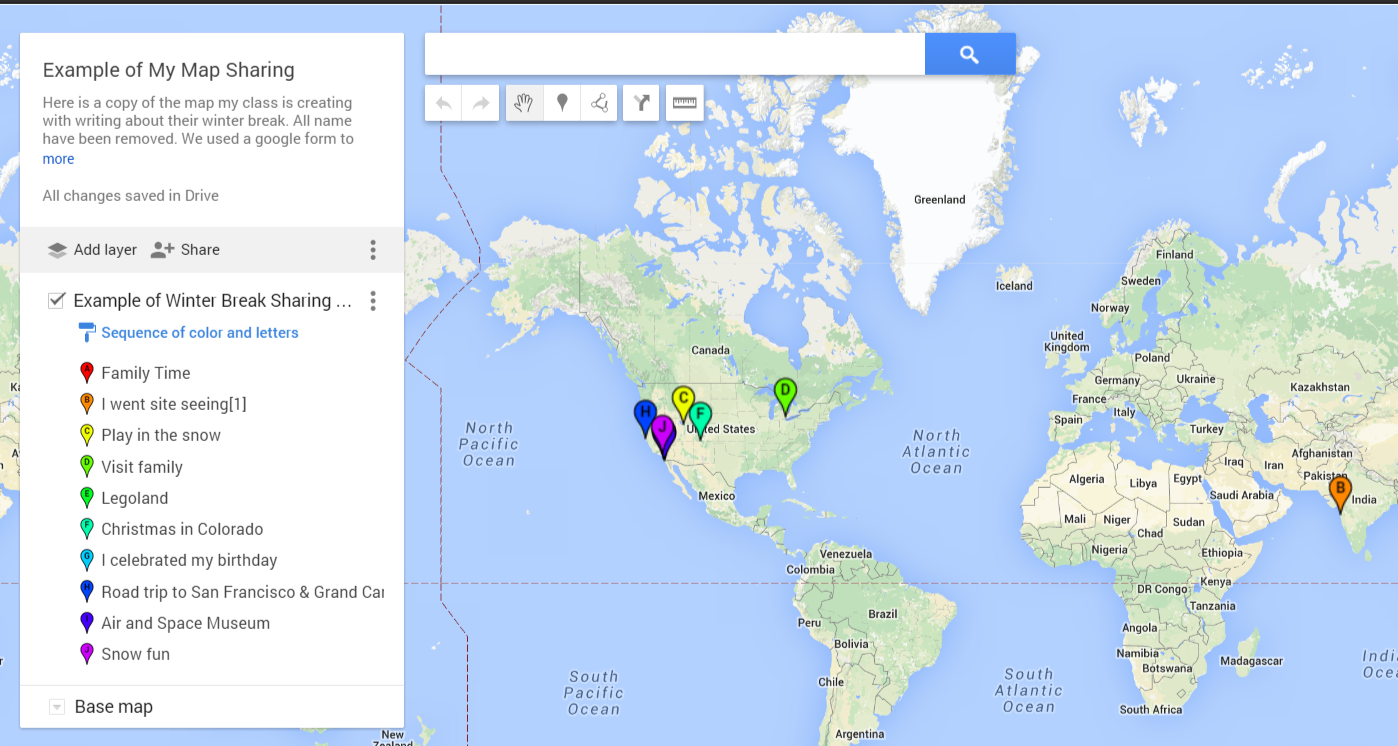
Here is an example of my students sharing info from their winter break (names have been removed.) Example of Winter Break sharing map (<Link to live map example).

Example of My Maps


I also have plans use Molly's suggestion to collect weather and climate data from family and friends of the students to compare data from all over. I'm sure there are many many uses for this tool. Comment with your ideas, I'd love to hear them!

Thank you, Molly, for the great idea and explanation!
https://twitter.com/followmolly
https://sites.google.com/site/mydigitalfootprint/

Tuesday, December 16, 2014

The Hour of Code Rocks!


This month, our school participated in the Hour of Code! This is an amazing program envisioned by Hadi Partovi to encourage more kids to try programming and learning computer science. This is our second year trying Hour of Code and it was bigger and better!
Every class had the opportunity to work on one of two courses created by Code.org for students in K-5 classes. These courses are far more than one hour and are more like 20 hours each. Our goal was for each student to learn some basics and to challenge them to go farther. Most did! In addition to the Code.org courses, students had the opportunity to work on Google's Made with Code, Scratch and many other programs.
After all this, I can truly say, WE♥CODE!


Friday, November 21, 2014

Hour of Code is Coming!


So excited to be planning Year 2 of Hour of Code at San Elijo Elementary! Last year was awesome with all of our classes giving it a try. Over 1400 elementary kids getting a taste of computer science and what makes all these fun things we use work.


Since beginning with Hour of Code last year, my second grade classes have made big progress through the 20 hour course with a few of the kids completing the entire course. As a school, we hired a computer lab tech who is helping make sure all kids have the same opportunities in technology. We've also started 3 after school tech classes, of which over 50% of the kids are girls. The older students have become mentors, helping the younger ones and their teachers learn how to use google apps and coding programs.

This year will be bigger and better! Thanks to more resources from Code.org, our Kinder and First graders will begin the Code.org Course 1 and the Second through Fifth graders will start on Course 2. In addition, we will be linking the extra activities that the students can work on through Scratch, creating with Flappy Bird, and Frozen! And our Tech Team of mentor students are ready to help wherever needed!


(When I emailed a couple former students Thursday morning to tell them the announcement about programming with Frozen, one parent replied "She just screamed and ran upstairs to try it!")

We are set to launch at our Friday Flag Assembly on December 5th. I'm thinking of trying the "Move It, Move It" activity with the kids directing our Asst Principal through a course with a couple obstacles. Hopefully, this will make for some great photo opps!

We will also have the classes view one of the Code.org videos right afterwards back in their classrooms. The next idea is to create a physical badge or sticker the kids can receive from a staff member. If we embed the video in a google slide show with info about Hour of Code plans for our school, we could add a secret message. Kids who decode the message and tell a school adult will receive the special badge. I'm so excited to pull it all together and share the excitement!

Tuesday, November 4, 2014

What's with that clock change thing?


One of the best projects my classes have ever done has been participating in Mystery Class through Journey North. In this global game of hide and seek, the search is on to discover the location of 10 mystery class locations somewhere in the world. Hundreds of classrooms participate in this project ranging from second grade through 12th grade. 
We start prepping for this hunt the first week of school by noting the sunrise and sunset times in our city. How many hours of daylight do we have? Next week, will it be the same, or different? Why is it changing? Each week we look up this data, graph it, talk about it, wonder what it means. We discuss and think about time zones - why is it later when we call grandma on the East Coast? We trace our shadows at differnt times in the day, why are they longer shorter, going this way or that?
In January, we will start getting sunrise and sunset times for the 10 mystery locations. Based on what we've observed in our local area, we will make predictions about where these sites could be. Later we'll get some more data and geographical clues to research, narrow down, and hopefully confirm our guess. We will be right? Even I, the teacher, don't know. But finally the true locations will be revealed. Whether we are right or wrong doesn't matter as much as the quest and learning. But we are usually right ;)
Which brings me to my original question, what's with this time change thing? This week, while charting our daylight hours and the sunrise and sunset times, we noticed something strange. The pattern of change for the daylight stayed the same, we are losing about 13 or 14 minutes of daylight each week - this week about 10 hours and 46 minutes of daylight here. But the graph for the sunrise and sunset times took a big jump to the left. What happened there? Our entire class was able to connect that changing the clocks made our graph have a big change. It didn't change the amount of daylight, we didn't actually add or lose an hour, it just stepped to the left (or moved to the morning.) 
(I forgot to take a photo of our working graph. I'll do that tomorrow and add it here.)

Saturday, October 25, 2014

Fun with Forms


If you haven't tried Google Forms you really should! There are so many fun and time saving uses for them. I've used them for student information gathering, polling, collecting student award names, quizzes, reading response logs and much more! Last week I had my second grade students use a google form to share great words that they came across in their reading. I had them predict what they thought the words meant and then look up the definition and add that. Here is the form I created to do this -


After they entered their vocabulary words, I copied the list of words from the spreadsheet that is automatically created for each form. I pasted the words into Wordle and made a word collage of their words. Here are their amazing words!


For more info about forms, check out the google tutorial.  http://www.google.com/forms/about/